
Multiple build plates, empty-layer bug and outdated 2D packing
I’ve recently started using Formware and, so far, I’m getting good printable results from it. There are two features I’m missing, though, plus one related bug.
Multiple build plates
I would really like to be able to create and switch between multiple build plates inside one project, as is possible in most current consumer slicers.
This is especially useful when preparing all the parts for a product that cannot be printed in one go. Keeping the parts on separate plates inside the same project is much more convenient than leaving the remaining parts outside the print area, and it makes it much easier to keep track of what belongs to each print.
Objects outside the print area create empty layers
Leaving parts outside the print area also exposes what appears to be a slicing bug.
If an object outside the printable area is taller than the objects on the plate, Formware creates empty layers up to the height of that object. An object that is completely outside the printable XY area should not affect the sliced file. It should either be ignored or trigger a warning.
Multiple-plate support would remove much of the need for this workaround, but the slicing behaviour should still be corrected.
Automatic 2D arrangement
The automatic 2D arrangement also seems quite outdated compared with Chitubox.
I tested both using the same parts and printable area. Chitubox fitted seven parts in around three seconds. In Formware, opening the 2D nesting tab alone took around ten seconds. Using “Top left”, 0.1 mm spacing in both directions and the maximum of 50 rotations, the actual arrangement then took another 14 seconds and fitted only six parts.
So Formware took substantially longer while still fitting one fewer part. It also tends to leave gaps that seem large enough to use.
This is a well-studied problem, and projects such as `jagua-rs` demonstrate how quickly large numbers of placement candidates can be evaluated using modern 2D nesting techniques. I would mainly like to see Formware’s packing algorithm modernised so that it can search more possible arrangements and produce denser results in less time.
Increasing or removing the limit of 50 rotations would also help, possibly together with a choice between a quick arrangement and a longer search for the best result.
The actual sliced results from Formware have been good for me so far. Improving these older workflow areas would make it much nicer to use for complete production projects.
Hi,
Thanks for the input.
Multi buildplates: you are the first to ask; but I see your use case. Makes sense.
I'll add it to our todo list.
Slicing bug: I'm not aware of this bug i'll check it.
It should discard any objects not overlapping the build platform. There is also a setting how to handle slice contours of parts that partially go outside the platform.
Nesting: i'm curious what parts you are trying then. I also don't get why it takes you 10 seconds to start up the command; it should be insant.
You can choose which algoritm you prefer; if you want more speed use the convex only shapes. If you want irregular (true shape) nesting it takes some more time.
Both algoritms are custom written and are 100% numerically robust. So they don't suffer in any way from floating point errors; which is a major problem in these problems.
Il'l read the paper from jagua-RS; can be very interesting.
kind regards
Elco
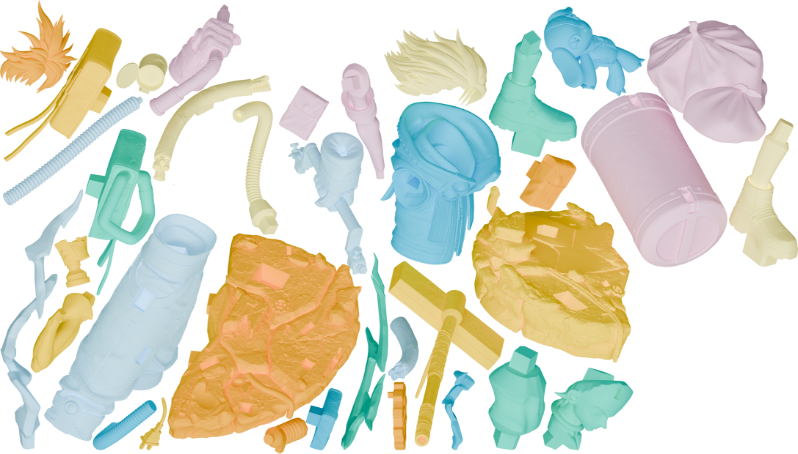
just as an example for Jagua - I use it for our product manuals (bottom right is reserved for a QR code in the final output - basically the outline is projected onto a 2d plane, then simplified then jagua arranges it, transformations get applied to blender and rendered.
For the 2 youtube videos - somehow nvidia recorded them with periodic flashing rainbows - sorry for that, that is something I do not see when using the software. They are still clear enough though only happens every now and then.
youtube.com/watch?v=r_Y-qNAVdVQ&feature=youtu.be
I've uploaded a video of what I mean with it misbehaving a bit above - seeing the user do it once is probably more useful than me trying to explain it again :P
This time the menu opened quickly, but the second run took forever. Of course, I don't care about time - it can take 15 minutes for all I care, as long as it can fit 7 parts on the plate like Chitu does - from ca 1:27 onwards you can see Chitu run the auto packing on the same parts and fit 7 for the same print dimensions.
---------
https://www.youtube.com/watch?v=cIUh1pmSd90&feature=youtu.be
This is the bug I am experiencing with slicing (empty layers). So I have found that when I move the other parts further away from the plate this does not happen. this is however, how the auto placing has placed the parts. The slicer based on the object count to be sliced treats them as on plate. I guess if multiple plates are added and the auto arrange spreads the parts out over as many of the plates as it needs this would be resolved as they wont be that close to the plate. (chitu just adds more plates if the parts dont fit)
---------
The auto packing, as dumb as that sounds, is right now the main thing that would prevent me from using this slicer as my main workhorse - we print a lot of different models so storing arranged plates for them is not feasible and manually arranging would lose me a lot of time.
The slicing and reliability of that has been amazing so far - the software even throws a warning on the empty layers which is great so I can skip UV Tools. The depth of adjustments possible via the settings is also amazing.
Ok thanks,
I'll have a look early next week when i'm back in office.
Report back then.
kind regards
Elco
Lovely - thank you so much!
If you need me to check / try anything else just let me know.
Also any chance you could guide me on activating the new UI (I've looked everywhere in the software and can't find it) - saw a screenshot somewhere and a mention of a dark mode. (or is this a restriction with the evaluation copy build?)
If you login to our website with your account;
Then navigate to downloads and view all versions. (expand panel)
Then for each version there are 2 options.
The other UI is called avalonia. It looks more modern.
It's in the works to add the dark UI (or custom coloring entirely) to the other classic windows UI as well.
But it might take some mroe months.
Elco
Hi Reminds,
I promised another in depth reply; here it is.
Empty layers bug
The slice core checks which models overlap with the platform in order to determine the slice height; but for speed consideration's i've always done this on boundingbox. As the slice core further down the process discards them (or unions/clips) these curves in case of vector output anyway.
So what you might have caused this, is that when you put a circle in the corner; the boundingbox of the circle overlaps with the build volume.
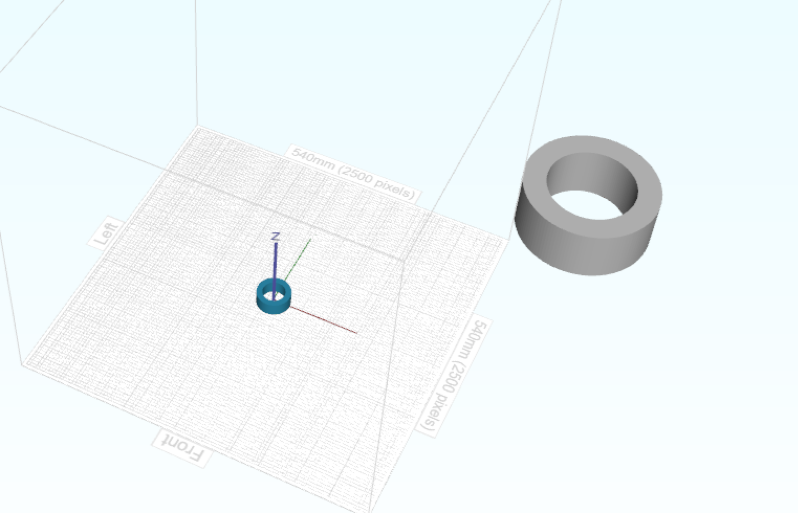
Fun fact.. chitubox (latest version) also has similar behaviour. Exact same test results in exact same problem.. this image below will result in many empty layers.
Then I looked at your video; and i think it's just a 'numerical' overlap of a small piece of the models that are auto-placed there by the nester. So I will add some extra margin there and it should not happen again.
For the future i'll see if I can determine a more accurate slice height first; before slicing. That would basically be a perimiter intersection instead of boundingbox. [todo].
Nesting
Then the nesting; which is a very interesting topic. Again thanks for bringing this research up.
I've read the papier from jagua-rs. Jagua-rs is basically an intersection library that 'brute' forces the question is a posible position intersects with already placed parts. It works with a Quadtree and basic trigonimetric intersection math (will line segment a intersect with segment b etc.) .
So still it's brute force which will have implications for speed. My assumption is here it will be slower with large part count and more detailed shapes (25 sides per polygon) but that's just an assumption based on years of developping all kinds of these algoritms; I didn't test it with a quadtree implementation.
The paper outlines that there are 3 methods to do 2d nesting;
- rasterization (slow)
- non-fit polygon (stating it's ideal but not stable in open source)
- trigonometric (stating it's slow -> and their library is the solution)
We use option 2; the nfp, but written it from the ground up to be numerically 100% stable. The paper is correct there; that is not open source findable.
So the NFP, it works well for high volumes of parts. And also allows for concave shapes (irregular) and parts inside other parts. (something chitubox doesn't do up till now, see for example the 2 images below)
The more interesting one is their other paper with the new nesting heuristic (sparrow). Which is basically the logic for what to place next and in which orientation. I'm going to have a look at that future because there is also a 3d version on github.
Where you are of course 100% right is your nesting example with 7 'relatively large' parts. chitubox definitely got a better outcome there. And I think for us adding a better heuristic with lower part count could definitely help here. i.e. try more rotations and discard early rotations that don't fit the platform. And in case of only 7 big parts; with relatively close sizes; try alternate orders of nesting as well. (not only biggest part first) [todo]
Hope to have given you some insight,
Elco
formware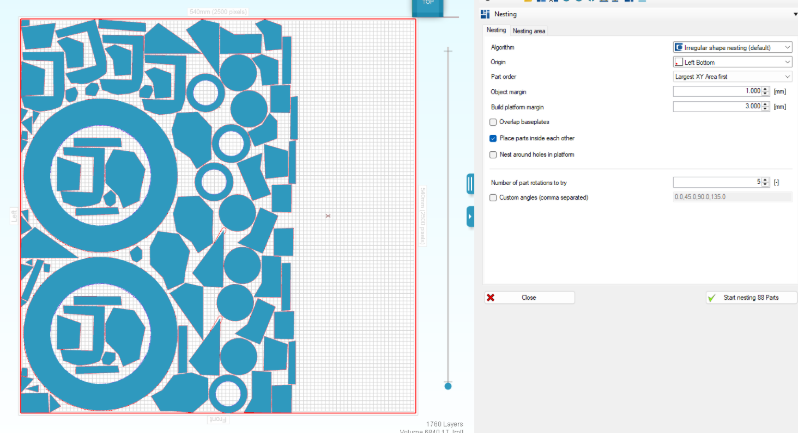
chitubox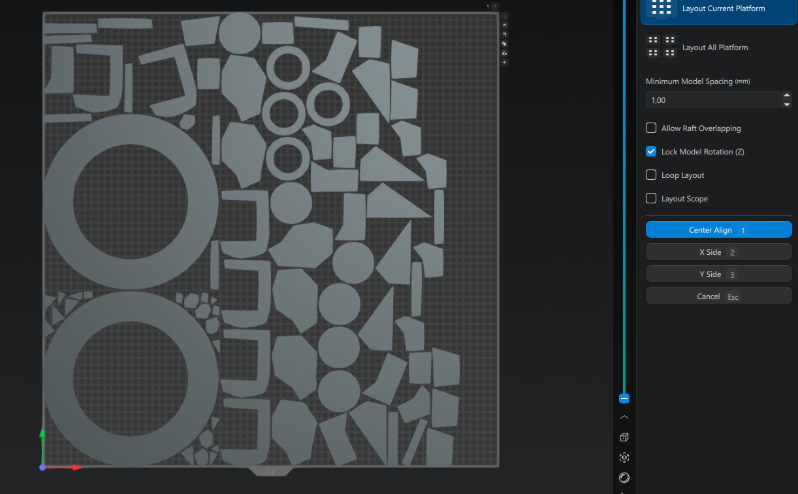
First off - thank you so much for the openness and explanation, this is greatly appreciated!
Secondly, below means no disrespect at all, I just found the problem interesting.
I've used this approach quite extensively (jagua-rs + sparrow(ish)) and it is quite computationally cheap. Because this is quite important to me and seemed like a fun project (after all I had most of it already from my Blender addon - just with the constraint that that had to scale down parts and arrange them until they barely fit into a space) I played around over the weekend to see how fast it can go.
Sample size I am using is ca 500 of the figurine STLs I have on my storage), picked at random some large some tiny already broken down into outlines.
Making it so parts could be placed into one another did require some creativity.
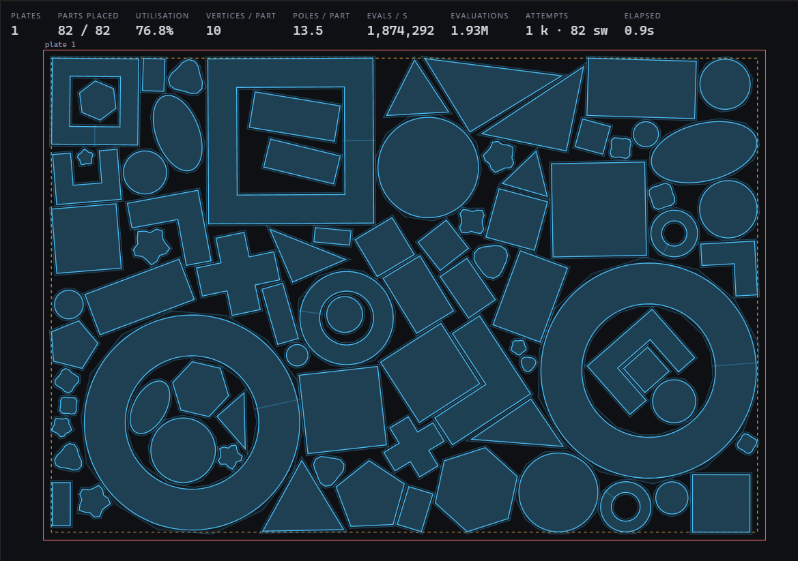
The shapes are quite complex (outlines of hair pieces etc) and it remains fast
[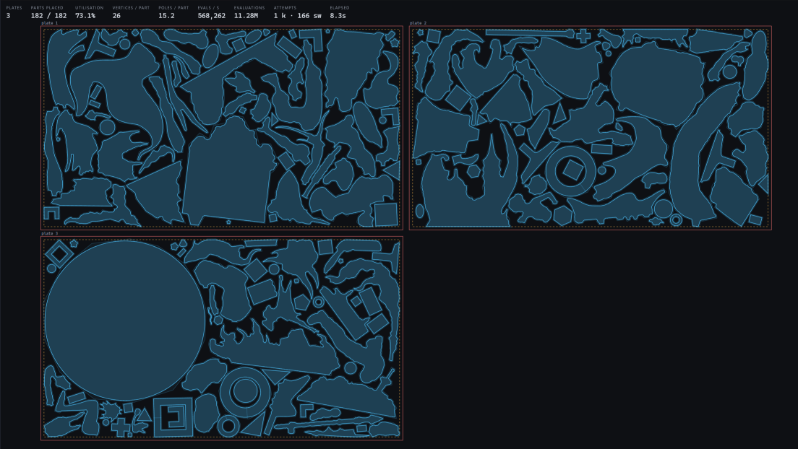
Do note that it could pack tighter but has the goal of packing into as little build plates as possible (basically my use case) and stops when it cant go onto less plates.
I've also tested different levels of details for the collision outline to attempt to further optimize.
Example run with 582 complex shapes: solving video on youtube
(packing starts at ca 1:30 before then outlines are scaled, clearance margins are applied, conversion to jagua-rs items) - the packing itself takes around 40 seconds for the 582 shapes.
The core build, nest, optimize part of it is a 3mb rust crate that could also be compiled into c with a wrapper.
I'll eventually open source this, probably this weekend, if you are interested or if this is of any use whatsoever.
Full disclosure this is a collaboration between me and various LLMs - otherwise I would not be able to do smth like this as a for fun weekend project.
Another disclosure: I don't have nearly your experience - so there may be problems with the approach I am taking that I am not even considering - although in thorough testing I have yet to find an overlapping part or other potential issues.