
Setting Up Export STL
r
raven0206
18 Feb 24
I just switched to a new computer and I have forgotten how to set up the export to STL option. Whenever I try to export to STL it just opens a new Formware program. I am trying to designate the program to be Anycubic.
f
formware
18 Feb 24
Hi Raven,
There are 2 ways.
- from the file menu directly, send as stl to other program.
The software detects installed software that accept .stl format as file extension. Usually anycubic workshop is there as well.
- in the machine workflow tab you can setup the stl link setting per machine.
This is then working under the slice menu, stl link. It does functionally the same.
(should be merged one day with 1. somehow.. it grew organically to this)
It could be you don't see the 'stl link' optoin in teh machine workflow tab; if that's the case you can add a 'default' machine that has all these tabs activated; and just copy over print/support profiles and teh correct size of the machine.
kind regards
Elco
r
raven0206
19 Feb 24
Hi there thank you for the quick reply! So when I try to change it under the machine workflow menu it won't let me, it is only registering/putting in Formware. When I select from the file menu it does nothing.
f
formware
19 Feb 24
You should be able to just enter the path to the .exe you want to open:
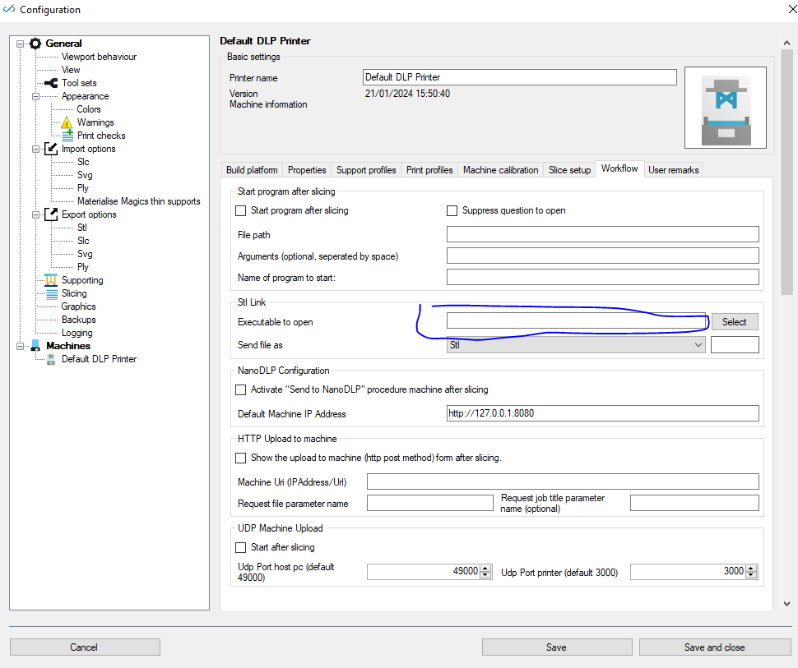
kind regards
Elco