
Transition layers function
Hello this is my first post, I would like to see if in Formware it is possible to activate transition layers I use that function in difficult resins and large prints, in Chitubox for sonic 4k and in Cura for Moai, but I cannot find that function in Formware, thanks
Hi,
Currently we don't have this option build in.
If you have a more expensive machine with custom GCode options you can use our gcode scripter that gives you 100% freedom.
Elco
I don't know nothing about gcode and I don't have any interest in learn this.
I'm designer and i don't have time for this.
I advise you to include this option as it solves many problems
Hi Nano,
What problems does it solve in your opinion?
Elco
Sometimes I have to use "difficult" resins for jewelry or to save shipping from China, the sudden change in speed makes that layer peel off, sometimes total and many partial, with this option that never happens
and??????
nothing to answer?
you will include this or not????
hello Elco
are you there????
Today I used for the first time printing on my Moai without vat inclination, in formware the impression failed on the layer where the printing speed changes, but in Cura activating 12 transition layers, the printer was a success.
please i want to use formware for everything
are you there????
Hi Nano,
Sorry slow reply; we had to move offices/workshop.
I will discuss it here on what the priority should be of this.
My business partner did a lot of printing lately and i'll check what he thinks and how we should implement it.
In general it's not a super easy change to make as it requires a lot of interface work and coding to do it correctly.
Elco
ok thanks for let me know.
Hi I have a Creality Halot Pro One and I have a printer profile that has 6 initial layers at 40Secs and 4 transition layers. The normal print time is 2.5 secs. If I time the period for which the UV LED is on I get the following:
6 initial layers illuminate for 40 Secs
4 Transition layers go straight to 2.5 secs.
Normal layers are 2.5 Secs.
I expected the transitions layers to linearly change from 40Secs to 2.5 Secs over the 4 transition 4 layers.
This may be a problem with the printer and not the slicer.
Please advise :)
Kind REgards
Nealet
Hi Nealet,
The creality machines have a file format that changed over the years. It might depend on machine firmware what it will accept.
Our database profile of the machine (and i think also yours) use CX_DLPV3 as an output file.
That is from a time there was no 'transition layer' features in any slicer.
Please update it to CX_DLPV4, under configuration -> machine -> slice setup -> slice format dropdown.
The CX_DLPV4 output script does contain the transition layer variables. (so it writes it to the file).
If the machine then does something with it (or accepts the newer file version) that is up to the machine in question...
Let us know if it works!
kind regards
Elco
Hi
This response has been a long time in the making, my apologies.
On My Creality Halot One Pro.
Using either the latest version (H2_303) or the version the printer came with (V1_H2_228). the printer only recognises sliced files using .CX_DLPV3, not .CX_DLPV4.
It also only uses the red ringed parameters in the photo.
It is a pity!
Regards Nealet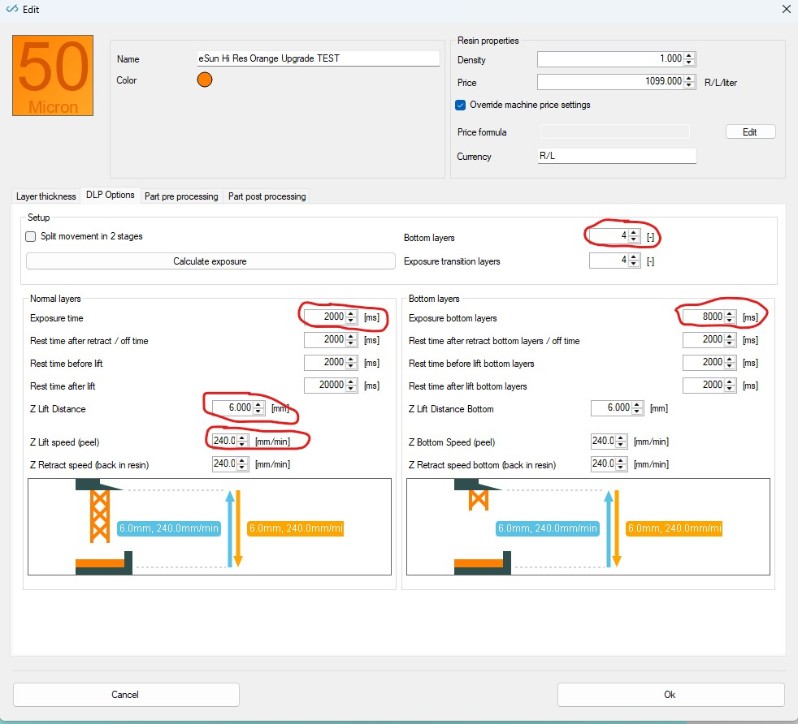
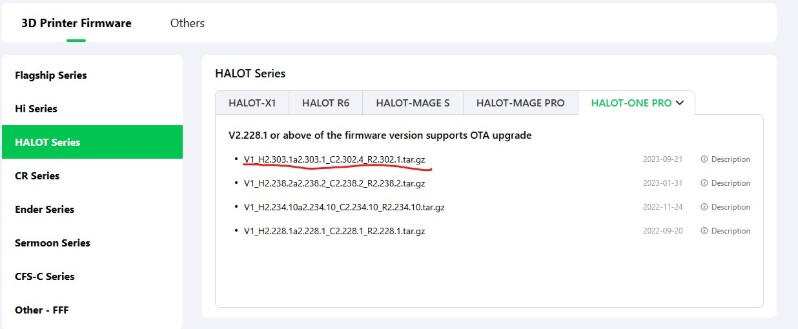
Hi Nealet,
Thanks for updating this.
it seems from the firmware dates that these are also pretty old (2023).
It could be the transition layers feature was not rolled out in industry at that point in time..
kind regards
Elco
Hi Elco
Yes thats fair comment. Those Creality firmware updates are the only ones that I can find so they have not updated their code in all that time. In addition a whole lot of other features also dont work, so Crealities functionality appears to be quite simple (even Crude) for the Halot One Pro.
Anyway thanks for your support.
Kind regards
Nealet