
Wireless printing with Saturn 4 Ultra
Hello,
I'm trying to set up my Saturn 4 Ultra for wireless printing but I cannot seem to get it to connect through the wireless options provided in the software.
Thanks,
Scott
Hi Scott,
We're working on making this happen. Expect it in 1-2 weeks.
kind regards
Elco
This is great news, I look forward to the update!
Thank you,
Scott
Short update; always takes longer than expected. But i wrote the entire implementation of this last weeks. Including the camera view, uploading, file management and start print. It's in testing now and will be release shortly.
kind regards
Elco
Hello Elco,
I downloaded the update and able to connect wirelessly to the Saturn U4. The file upload and camera features are working well, but I cannot view the uploaded files in the file management screen. The printer does not respond to the ‘start printing’ command either.
Am I doing something wrong?
Kind regards,
Scott
Hi Scott,
Good question. I have developed this feature on the new Phrozen that is coming out. But it should have the same SCDP interface and electronics accordign to ctb tech.
- you are able to find/connect/upload?
- do you see the uploaded files on the printer?
can you try with a fresh start (reset printer) without starting up the camera?
In our experience the camera is still a bit problematic and it crashes the machine to often.
Perhaps it's that.
Elco
I am able to connect to the printer and upload sliced files to the machine. I can print these files if I am at the printer.
Unfortunately, I cannot print from the computer. The print files are not showing up in the file management window UI and the printer won’t respond to the start command.
Hi Scott,
That's very strange. Probably something in the communication doesn't work.
Some thoughts.
- In our configuration -> machine -> workflow -> upload -> near the ip address field there is a checkbox 'show in tool window', if you uncheck that the upload will show in a seperate dialog window instead of in the tool window.
In this dialog window there is a log checkbox; if checked it will show you the communication log.
Perhaps this shows anything of an error?
- The communication protocol for these machines is outlined here:
https://github.com/cbd-tech/SDCP-Smart-Device-Control-Protocol-V3.0.0/blob/main/SDCP(Smart%20Device%20Control%20Protocol)_V3.0.0_EN.md
I strictly followed that. I'm thinking; perhaps your local drives on your printer are not /usb/ and /local/ but they named them something else and it can't find them? Then it couldn't list files and couldn't send print command. You can see these folder names on the machine LCD..
Kind regards
Elco
same problem not working here!
Hi Jose,
I'll double check it. Did you check my suggestion if that works?
And what are the folder names on your machine?
kind regards
Elco
Hi both,
I've ordered the saturn 4 ultra. It will arrive wednesday and i'll have a look than what is causing these issues.
I've tested the entire implementation on a prototype machine from another manufacturer; assuming that ctb uses a uniform protocol accross all machines/pcb's. Lets see what this brings.
kind regards
Elco
Hi Scott,
I finally received our saturn 4 ultra and was able to open it up and connect.
I just open the software; add the printer from the online environment and click the connect icon next to the printer selection. It results in the machine status opening; automatically scanning the network; finding the machine.
Then you just click 'connect' and it should show you the file list as well.
Alternatively you can open the 'upload to printer' command (slice menu). (2nd screenshot below)
Thsi will open roughly the same tool in a dialog. there you can enable the 'log' checkbox and see what it sends/receives. Check this box and then click connect.
Can you share a screenshot of what you see?
kind regards
Elco
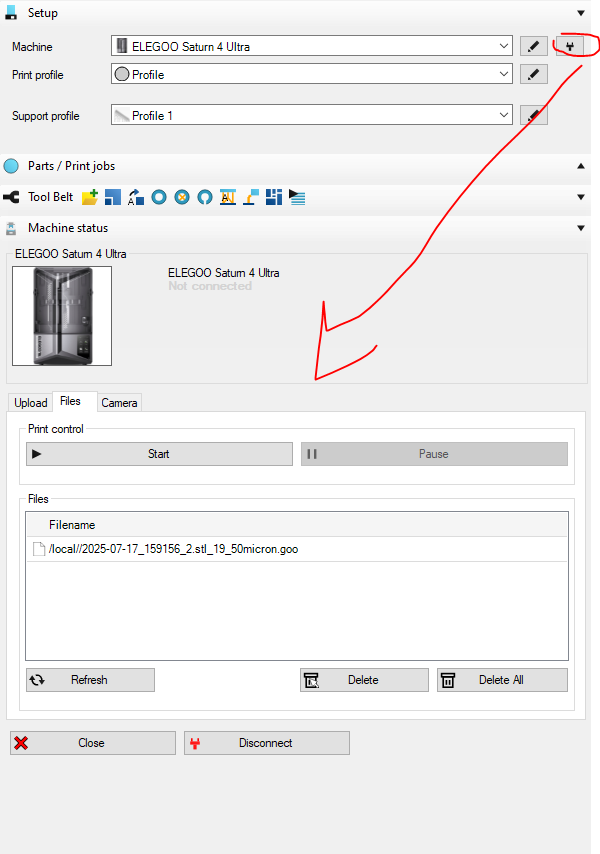
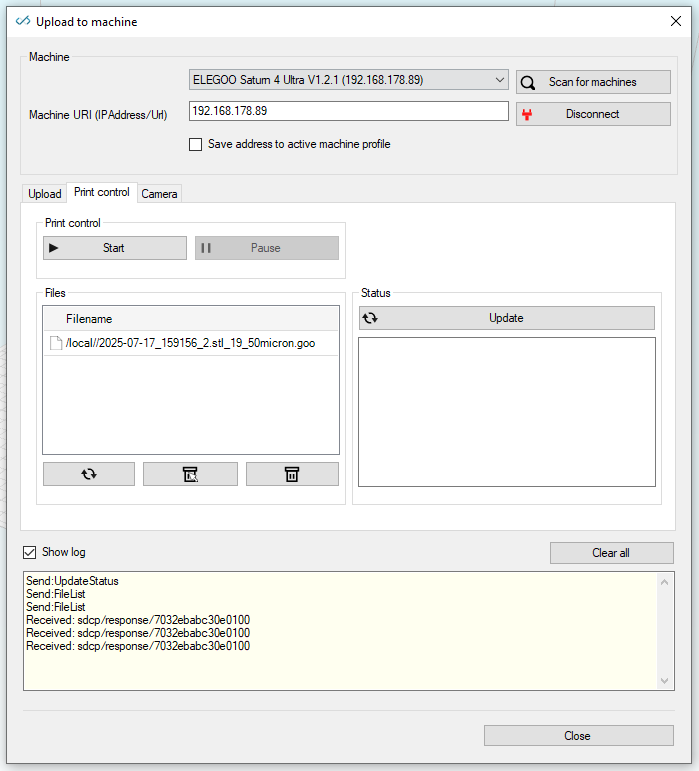
i do see by the way that the status in the tool box stays 'not connected'. that is not correct; i'll check that.
Hello Elco,
I have duplicated the print dialogs with screenshots. *see attached
Thank you,
Scott
not seeing any screenshot?
Sorry, trying again
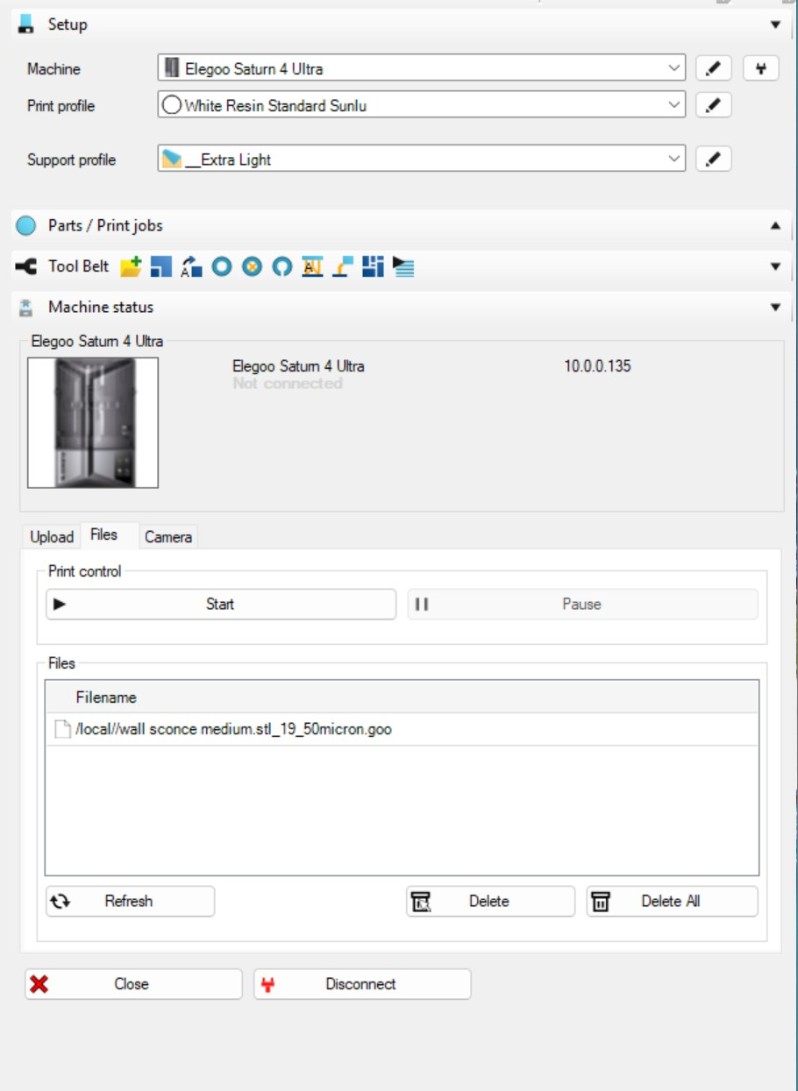
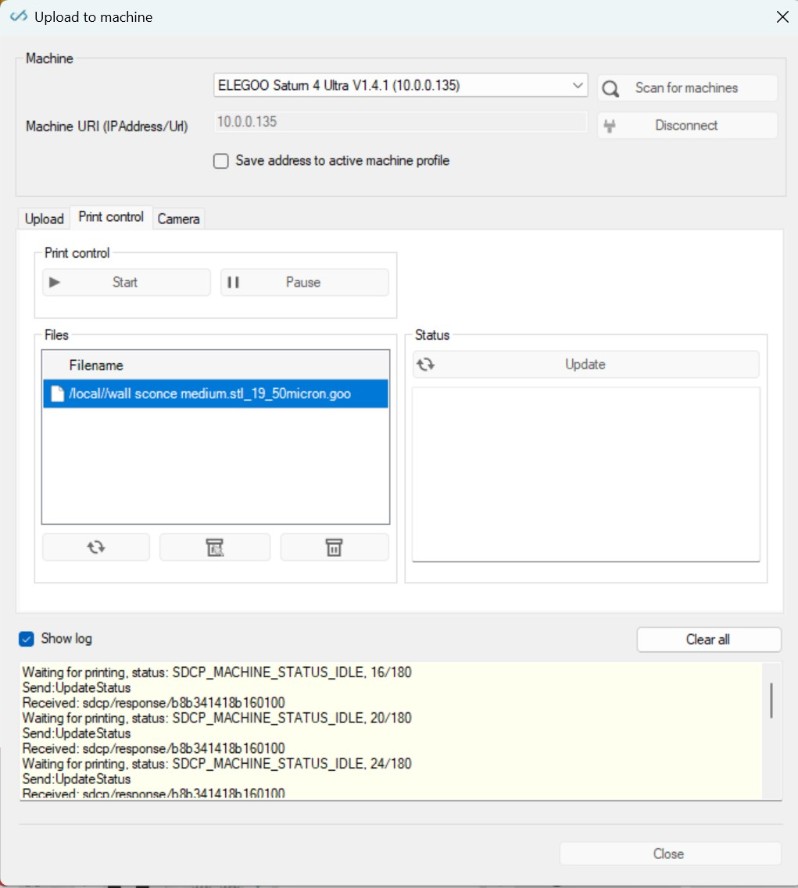
Hi,
So in the top screenshot; if you just select the file and press 'start' it doesn't work?
The bottom screenshot looks strange to me; i'll have to check that. Or it hangs in some kind of uploading mode; or it's because it's already connected in the toolwindow. Might be there is something blocking double communicaton to the machine.
Kind regards,
Elco
Hello Elco,
That is correct. When I press 'start' the log file keeps repeating SDCP_MACHINE_STATUS_IDLE and the machine does not run. It will do this repeatedly until I force close the application through the task manager.
Thank you,
Scott H
Hi Scott,
I think i found the root cause of this problem. Our software was not parsing the response of the status call properly. The documentation mentioned a format for a specific number as '0' but they return '0.0' from the machine.. this apparently only happens when the machine is in use for a couple of prints. that's why i didn't notice in testing..
I've made our code a bit more flexible now and will try to push a fix later this week. I hope this will fix all the issue with it.
kind regards
Elco